
12 · Finance
Income Money in, outside the website.
In ERAFinance › Income
Who uses itOrganizer
The extra income of one event: the money that does not come through the website, written by hand.
What it is for
Entries, shop, tyres and photos paid online are already counted by ERA. Here you add the rest, for example a sponsor's contribution or the hospitality sold at the track, so that the event balance is complete.
Before you start
The championship needs at least one income category. Create them in Income categories.
Step by step
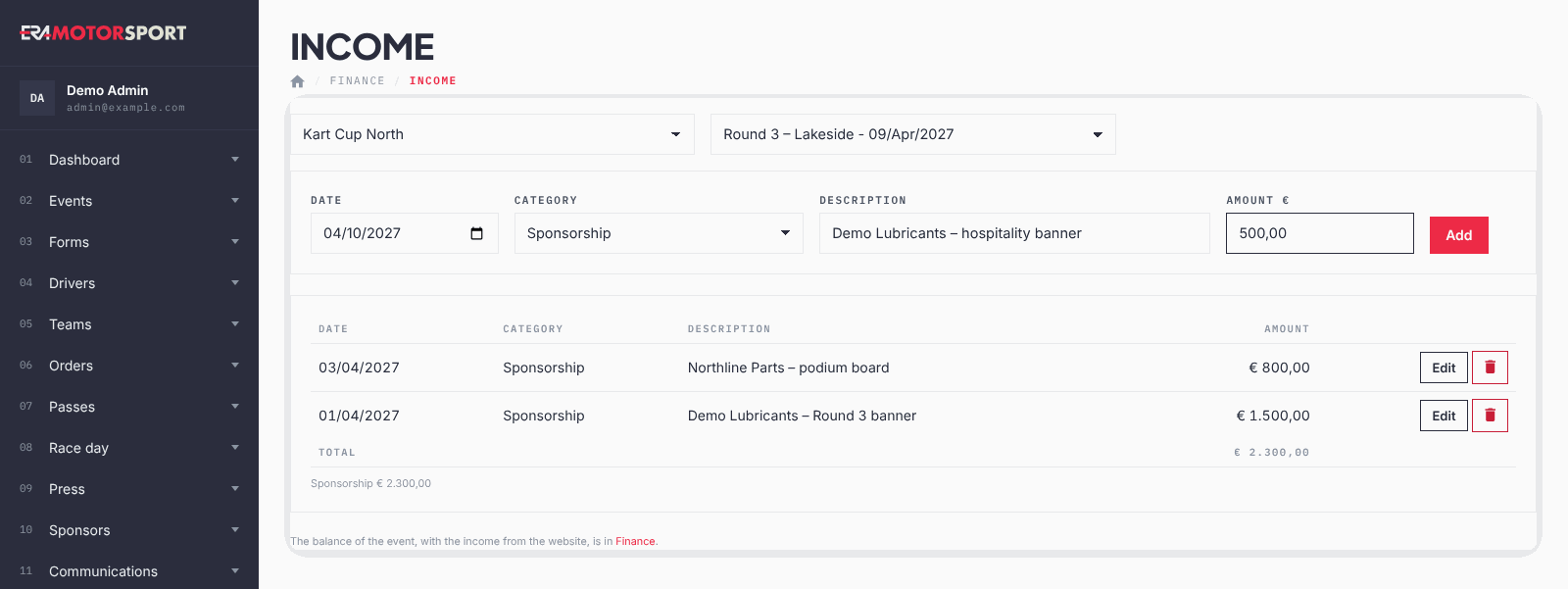
- Open the page. Go to Finance › Income and choose the championship and the event.
- Fill in the line. Choose the Date (today by default), the Category, write the Description and the Amount €, for example 1.500,00.
- Add it. Click Add. The line appears in the table, the most recent at the top, with the Total below and the total of each category.
- Correct a line. Click Edit on the line: its data go back into the form. Change them and click Save, or Cancel editing.
- Delete a line. Click the bin button and confirm.
What ERA checks
- Category, description and an amount above 0 are required.
- Only the categories in use are offered; a hidden category stays on the lines that already have it.
- Delete asks for a confirmation.
Common problems
| What happens | What to do |
|---|---|
| A yellow message says there is no income category yet. | Add the categories in Income categories. |
| "Choose the category and write the description and an amount above 0." | Fill in all the fields; write the amount with a comma for the cents, for example 250,50. |
| A category is missing in the list. | It is hidden: click Use again in Income categories. |
See also
Something does not match what you see in ERA? Write to us from the contact page.