
01 · Dashboard
App stats How drivers use the app.
In ERADashboard › App stats
Who uses itOrganizer · Superadmin
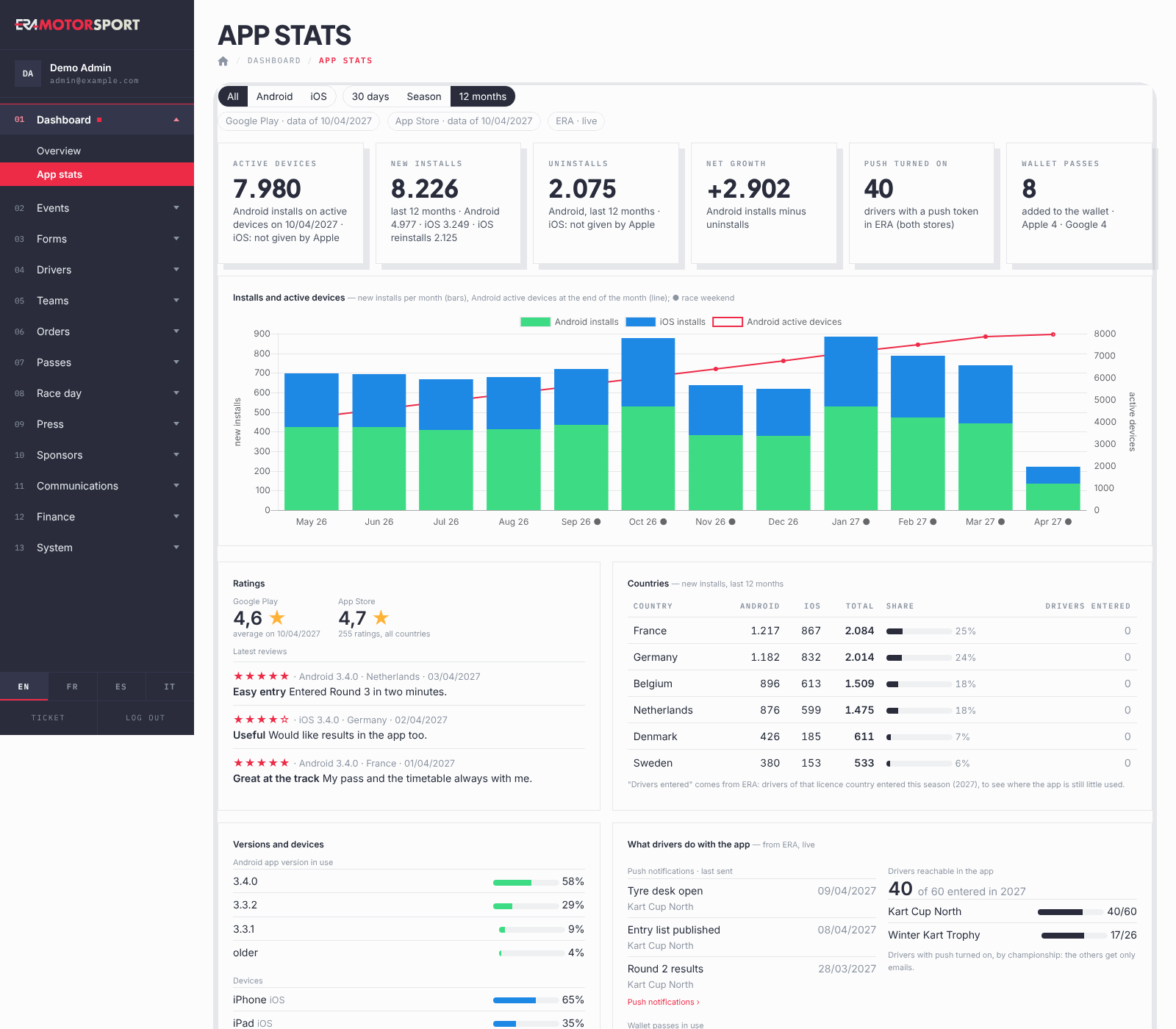
App stats shows how the app for drivers is doing: how many install it, where, how they rate it, and how many entered drivers you can reach with a notification.
What it is for
Use it to see whether the drivers of the season have the app before a round, in which countries it is still little used, and how many drivers get the push notifications instead of only emails. The page covers the app as a whole, for all championships: it does not follow the championship list of the other pages.
Step by step
- Open the page. Go to Dashboard › App stats.
- Choose the platform and the period. At the top choose All, Android or iOS, and 30 days, Season (since 1 January) or 12 months.
- Check how fresh the data are. The chips under the filters give the day of the last data from Google Play and from the App Store; they turn yellow when the data are more than 5 days old. ERA · live means the numbers from ERA itself are up to the minute.
- Read the tiles. Active devices, New installs, Uninstalls, Net growth, Push turned on (drivers with notifications on) and Wallet passes (passes added to a phone wallet).
- Read the chart. Installs and active devices shows new installs per month (per day with 30 days) and the Android active devices. A ● next to a month or day marks a race weekend: point at it to read the events.
- Read ratings and countries. Ratings gives the average of each store and the last reviews; low ratings are highlighted. Countries lists the top countries by new installs, with Drivers entered this season from that licence country.
- See what drivers do with the app. The last push notifications sent, the Wallet passes in use by drivers, teams and press, and Drivers reachable in the app: how many drivers entered this season have notifications on, by championship: the six championships of ERA with the most entries this season, not only yours. The push notifications listed are also the last ones sent in all of ERA.
What ERA checks
- The App Store does not give active devices, uninstalls or crashes: on iOS those tiles say so instead of showing a number.
- Net growth is Android only: installs minus uninstalls.
- Push turned on, Wallet passes and Drivers reachable in the app come from ERA, for both stores.
- Drivers entered counts the drivers not refused in a form of this season. Countries with at least 3 entered drivers and few installs are added to the list, so you see where the app is missing.
- Crashes and freezes are shown for Android, for the last 7 days.
Common problems
| What happens | What to do |
|---|---|
| No store data for this period yet. | The store data are not in yet, or the period is too short. Try 12 months. If it lasts, tell a superadmin. |
| A chip is yellow | The store data are old. The ERA numbers are still right. Tell a superadmin if it lasts more than a few days. |
| Few drivers reachable | Remind drivers to install the app and turn notifications on. The others get only emails. |
See also
Something does not match what you see in ERA? Write to us from the contact page.