
03 · Forms
Option lists The dropdowns of the forms.
In ERAForms › Option lists
Who uses itOrganizer
The option lists are the dropdowns of the registration forms. Drivers choose an item on the website and at the track, and the entry keeps it.
What it is for
Some forms ask for equipment homologated by the federation: chassis, helmet, suit, gloves, shoes, body protection, oil brand and model. Each of these fields reads its own fixed list. For any other question with a fixed set of answers, for example "Engine brand", you create a list of your own and add it to a form with a field of type Choice from a list (a list of Forms › Field lists).
Step by step
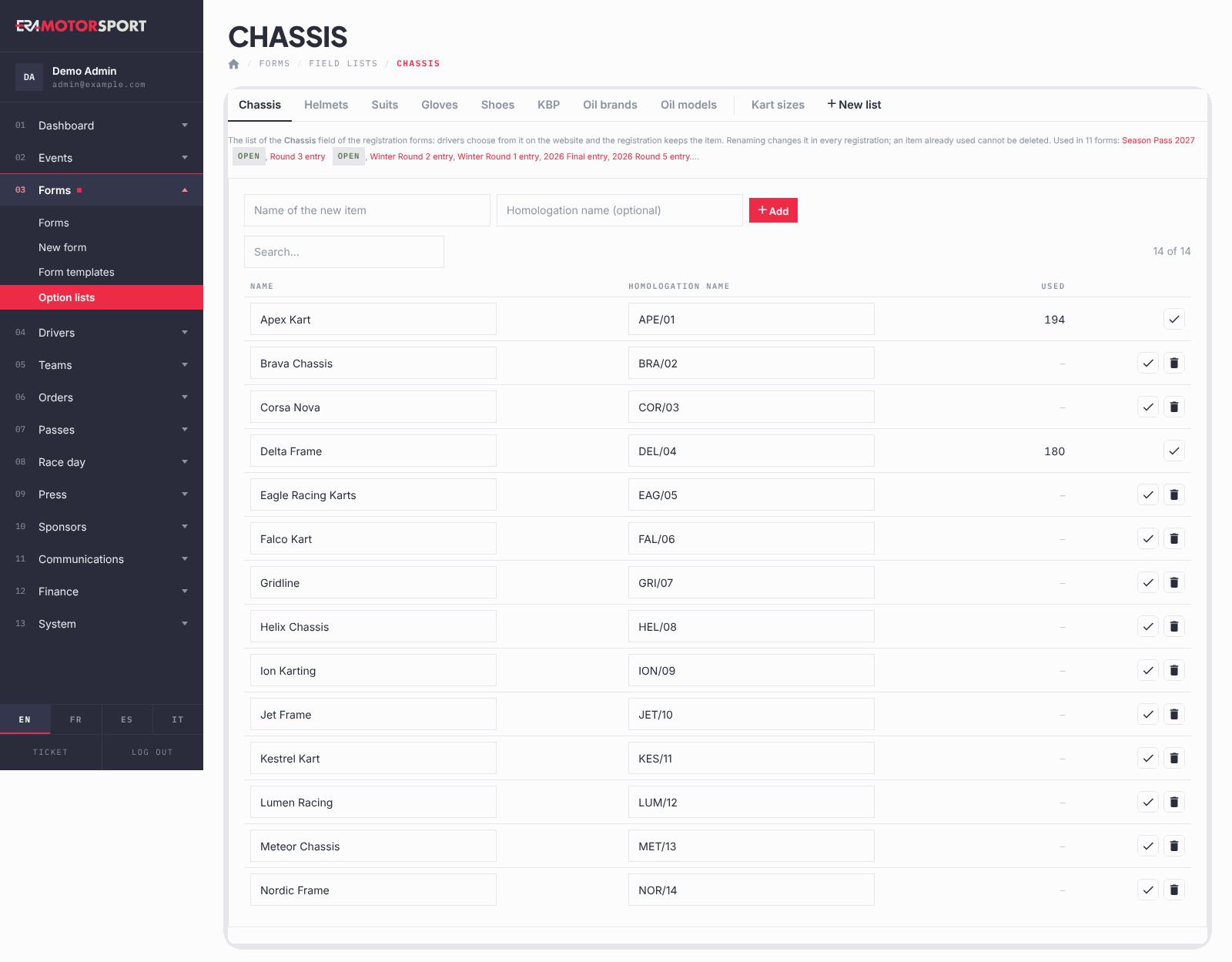
- Open the page. Go to Forms › Option lists. The tabs at the top are the fixed lists (Chassis, Helmets, Suits, Gloves, Shoes, KBP, Oil brands, Oil models), then your own lists, then New list.
- Find an item. In a fixed list type in Search… to filter the rows. The column Used shows how many entries chose each item (for chassis also driver profiles and team karts; for oil brands also their oil models).
- Add an item. Write the Name of the new item and click Add. For a chassis you can add the Homologation name; for an oil model choose its brand first.
- Correct an item. Change the name in the row and click the tick icon to save. The new name appears in every entry that chose it.
- Create a list of your own. Click New list, write the Name of the list and the Items, one per line, and click Create the list. You can add items later too.
- Use it in a form. Open the form in the form editor, tab Fields, click Add a field to this page, choose the type Choice from a list (a list of Forms › Field lists), pick the List and write the question as the name.
- Keep your list in order. In your list, use the arrows to move items: the order here is the order of the dropdown. Under the items you can rename the list or, if no form uses it, Delete the list.
What ERA checks
- An item already used by an entry cannot be deleted: the bin icon appears only when Used is empty. Rename it if it is wrong.
- The same name cannot be in a list twice (capitals do not count). Two oil models with the same name are allowed only under different brands.
- An oil model needs its brand.
- A list used by a form cannot be deleted, even if nobody has chosen an item yet.
- Two of your own lists cannot have the same name.
- The lists are shared: the same lists serve the forms of every championship in ERA.
Common problems
| What happens | What to do |
|---|---|
| "… is used: it cannot be deleted. Rename it if it is wrong." | Correct the name instead. The entries that chose it show the new name. |
| A driver cannot find a helmet or a chassis. | Add it to the right tab. It appears in the form at once. |
| Delete the list is missing. | A form uses the list, even through a hidden field. Delete that field in the form editor first: this is possible only while it has no answers. |
See also
Something does not match what you see in ERA? Write to us from the contact page.