
07 · Passes
Entry sheets The signed file of the event.
In ERAPasses › Entry sheets
Who uses itOrganizer
The page prints one A4 page for each entry of an event: the official entry form, ready to sign and keep in the folder of the event.
What it is for
Some federations want a signed entry form for every driver, kept by the organizer for the checks at the track. ERA builds it from what the driver wrote on the website or at the counter, so you do not copy anything by hand.
Each sheet has:
- the championship, the event, the track and the dates; the registration number and when it was sent;
- driver, category and race number; payment amount, method and status (paid or to pay); the form, marked as season pass when it is one;
- all the data of the form, page by page (driver, entrant, guardian, equipment), with the names of the items chosen from lists;
- the declaration of the championship, if one is saved;
- the signatures given online or at the counter. A missing signature leaves an empty box with (not signed online: sign here);
- the list of attachments (licence, medical certificate, photo…) and, at the bottom, Checked by: ____ and Stamp.
Before you start
- To have signature boxes, the forms of the event need the signature fields (signature of the driver, of the entrant, of the guardian). If they have none, the page tells you so.
- Choose the language of the sheets in the championship: Language of the race-day prints in Events › Championships. The sheets are printed in that language, whatever the language of who prints them.
Step by step
- Open the page. Go to Passes › Entry sheets and choose the championship and the event.
- Read the table. For each category you see the Registrations and how many are Paid.
- Print everything. On the All categories row press All, or Only paid to leave out the entries still to pay.
- Or print one category. Press Print on its row.
- Print or save as PDF. The sheets open in a new tab with a bar on top. Press Print and choose the printer, or "Save as PDF". Each entry starts on a new page.
- Collect the missing signatures. At the desk, the driver or the entrant signs in the empty boxes. To have the guardian signature in ERA, collect it on the tablet at the on-track desk before printing.
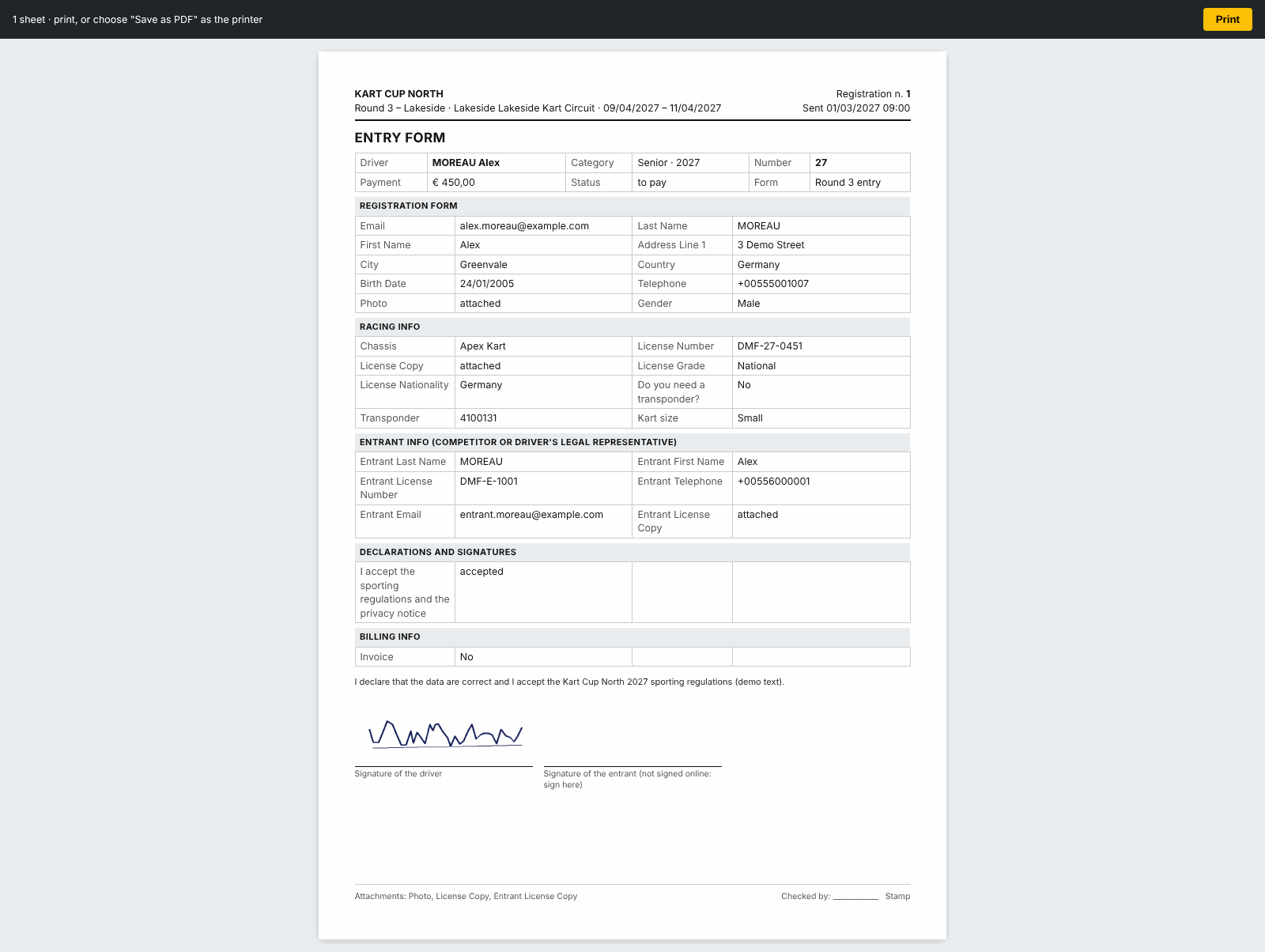
You can also print the sheet of a single entry with Entry sheet in the entry card.
What ERA checks
- All entries of the event are printed except cancelled ones, whether paid or not (unless you choose Only paid).
- Season passes that cover the event are included. For an event with "Test" in its name they are not.
- The boxes of the driver and of the entrant are always printed when the form has those fields. The guardian box is printed only when the guardian has already signed.
- You print only the sheets of your own championships.
Common problems
| What happens | What to do |
|---|---|
| The sheets have no signature boxes | The forms of the event do not ask for signatures. Add the signature fields in the form editor. |
| The sheets come out in the wrong language | Change Language of the race-day prints in the championship. |
| A sheet has no declaration text | The championship has no declaration saved. |
| "No registration to print with these filters." | No entry in that category, or none paid with Only paid. |
See also
Something does not match what you see in ERA? Write to us from the contact page.