
02 · Events
Gallery The photos of an event.
In ERAEvents › Gallery
Who uses itOrganizer · Superadmin
The event gallery holds the photos the website shows for an event. Driver photos are tagged with race numbers, so each driver finds their own photos.
What it is for
After a round you upload the photographers' pictures in one go, then check that each driver photo carries the right race numbers. Paddock photos need no number.
Before you start
- The race numbers find the drivers among the entries of the event and of the season passes that cover it. Upload the photos when the entry list is complete.
Step by step
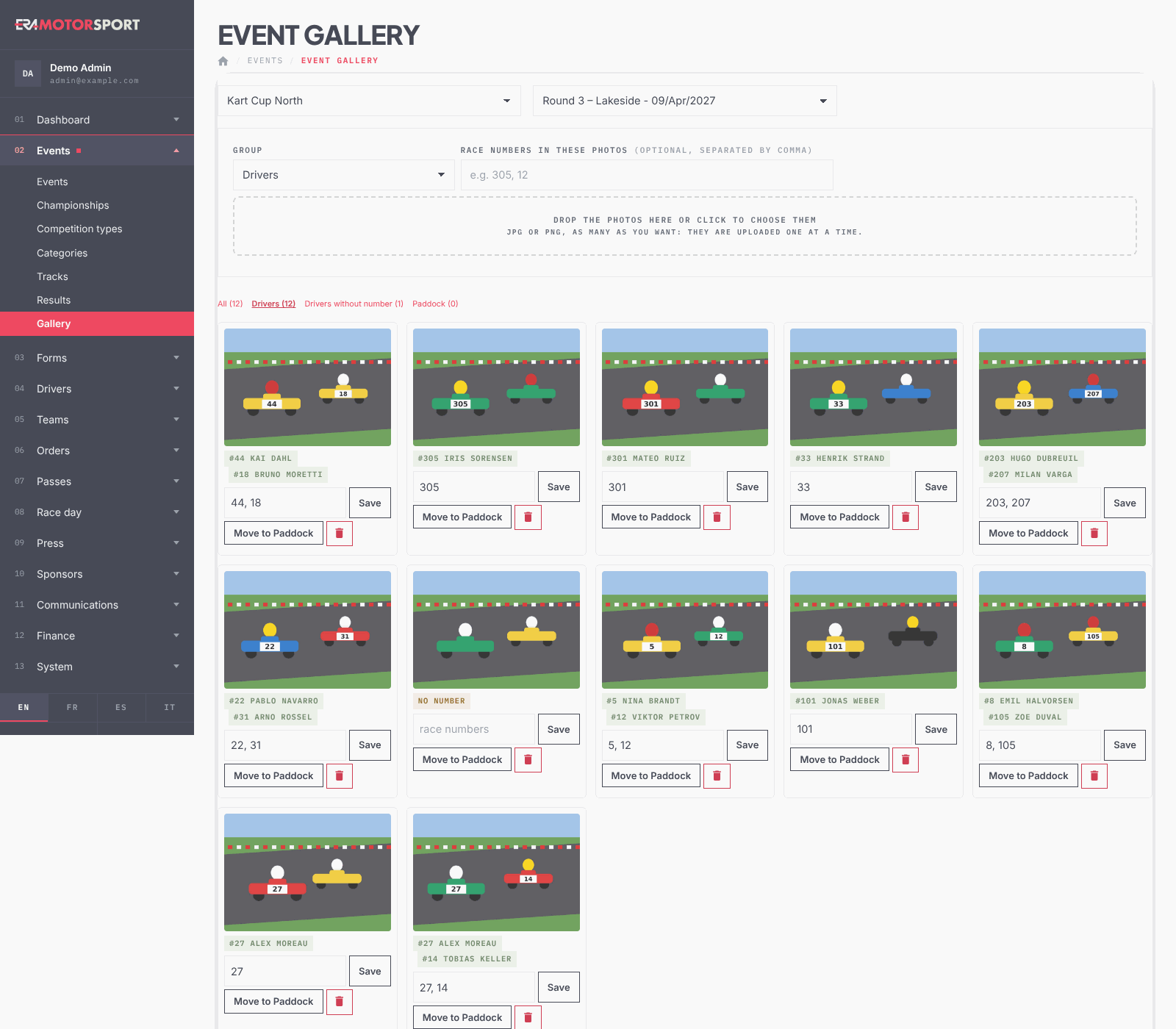
- Open the page. Go to Events › Gallery and choose the championship and the event.
- Choose the group. Under Group choose Drivers or Paddock. For driver photos you can write the Race numbers in these photos, separated by commas, if they are the same for all the photos you upload now.
- Upload. Drop the photos on the box or click it to choose them: JPG or PNG, as many as you want. ERA uploads them one at a time, shows the progress and reloads the page at the end.
- Find the photos to tag. The tabs show All, Drivers, Drivers without number and Paddock, 48 photos per page; Older → and ← Newer move between pages.
- Tag the drivers. Under each driver photo write the race numbers, for example "27, 305", and press Save. The tags show the number and the driver found.
- Let ERA suggest the numbers. The button next to the tabs reads the 3-digit numbers on the photos of this page that have no number yet, with photo recognition. Check each suggestion (highlighted in yellow), correct it, then press Save on each photo.
- Move or delete. Move to Paddock or Move to Drivers changes the group of a photo. The bin deletes it from the event after a confirmation.
What ERA checks
- Only real JPG or PNG images are accepted. Each file has a size limit set on the server; ERA tells you if a photo is too big.
- ERA never reduces the gallery photos: they stay at full resolution, because they can be downloaded or sold.
- A number with no entry in the event is not tagged: ERA answers "No entry with number … in this event."
- Paddock photos have no race numbers.
- The number suggestion is only a proposal: nothing is saved until you press Save.
Common problems
| What happens | What to do |
|---|---|
| A number is not found | Check the race number in the entry of the driver. The number must belong to an entry of this event or of a season pass that covers it. |
| Every photo of this page has a number | The suggestion works only on photos without numbers. Go to Drivers without number. |
| The suggestion finds no number | The number is not readable or has fewer or more than 3 digits. Write it by hand. |
| A photo is not uploaded | It is not a JPG or PNG, or it is too big. Resize it and upload it again. |
See also
Something does not match what you see in ERA? Write to us from the contact page.