
Race numbers One number per kart, per class.
Race numbers shows the numbers of a race class by class and lets you fix them before the passes and the entry list go out.
What it is for
Before a race every kart needs a number, and each number can be used once in a class. This page puts each class of the race on its own card, shows who has no number and which numbers are used twice, and lets you change numbers in the table or give the free ones of the class range to everyone still without a number.
Before you start
Each class should have its race number range, for example 100-199, set in Categories. Without a range you can still write numbers by hand, but ERA cannot fill the gaps.
Step by step
- Choose the race. Go to Drivers › Race numbers and choose the championship and the event.
- Read each class. Each card shows the class, how many drivers, the range ("not set" if missing), how many are without a number and how many numbers are used twice. Rows with a double number are highlighted.
- Change numbers. Write the new numbers in the No. column. Empty the box to take a number away. Click a driver name to open the entry card.
- Save. Press Save the numbers. ERA saves all the changes of that class together and tells you how many were saved and which were not.
- Fill the gaps. Press Give a number to who has none (it shows how many) and confirm. ERA gives each driver without a number the first free number of the range, in order of entry: who entered first gets the lower number.
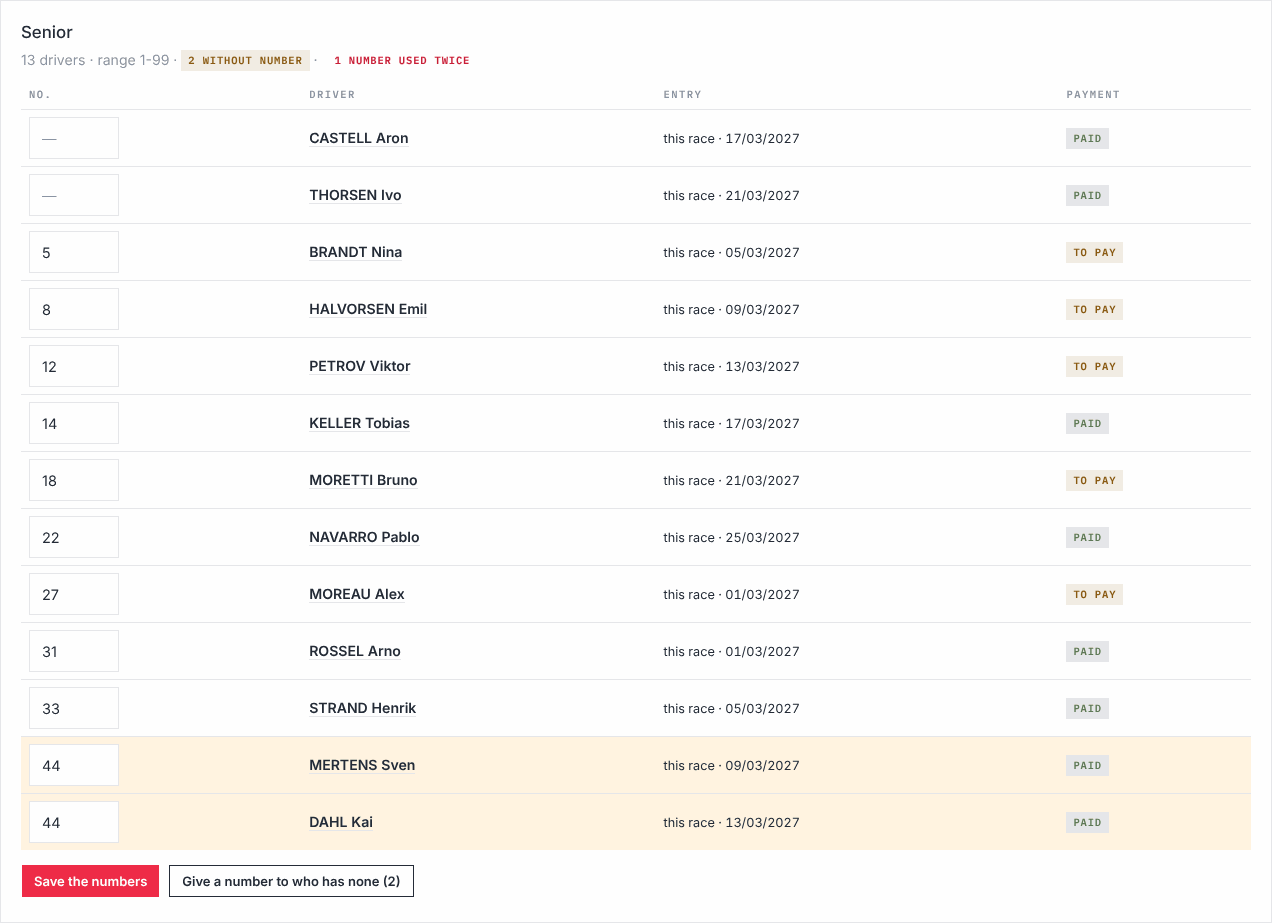
The table lists the entries of the race that are not cancelled, confirmed or to pay, including the season passes that cover the race ("season pass" or "this race" in Entry).
What ERA checks
- A number is unique in the class of the race: same class, or a class with the same name, in the race forms and in the season passes that cover the race. For a season pass the check covers every race of the pass.
- A number already used is not saved: ERA tells you which one and the nearest free number, e.g. "No. 127 is already used (128 is free)".
- Only digits are accepted; numbers are saved with three digits (7 becomes 007).
- Give a number to who has none stops when the range is full and tells you so.
- Entries without a class cannot be numbered here: Choose the class in the registration card first.
- Every change is written in the Action log.
Common problems
| What happens | What to do |
|---|---|
| The class has no race number range: set it in the class card (e.g. 100-199). | Set the range in Categories. |
| A number is "already used" but you do not see it in the card. | It is used by a season pass driver or in a class with the same name: search it in Entries. |
| "the range … is full". | Widen the range of the class, or free numbers of drivers who withdrew. |
| Page expired: try again. | Reload the page and save again. |