
02 · Events
Tracks The circuits.
In ERAEvents › Tracks
Who uses itOrganizer · Superadmin
Tracks is the list of circuits. An event chooses its track from here, and the website and the automatic poster take the track data from it.
What it is for
You add a circuit the first time a championship races there; then every event at that track uses the same data. The list is shared by all championships.
Step by step
- Open the page. Go to Events › Tracks. Search by track, city or country. Each row shows city, country, length, direction and how many events use the track. no drawing means the poster cannot draw the circuit.
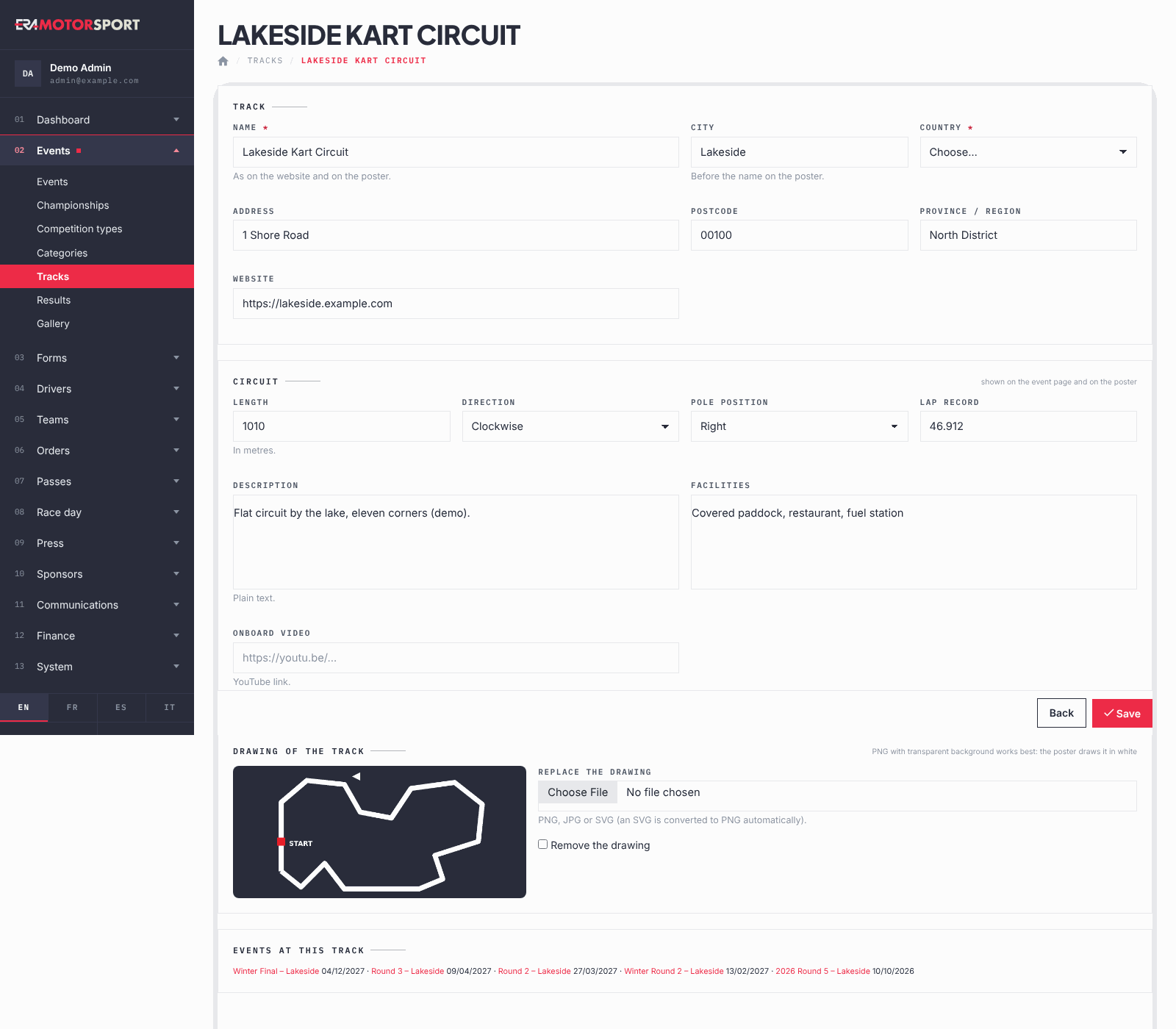
- Add a track. Press New track. Write the Name as on the website and the poster, the City (it goes before the name on the poster) and choose the Country. Add Address, Postcode, Province / region and Website if you have them.
- Fill the circuit data. Length in metres, Direction (Clockwise or Anticlockwise), Pole position (Right or Left), Lap record, Description, Facilities and an Onboard video link.
- Upload the drawing. Under Drawing of the track choose a PNG, a JPG or an SVG. A PNG or SVG with a transparent background works best: the poster draws it in white. ERA converts an SVG to PNG when you upload it, so it appears on the automatic poster too.
- Save. Press Create the track or Save. The card then lists the Events at this track.
What ERA checks
- Name and Country are required.
- Website must be a website address. Onboard video must be a YouTube link.
- The drawing must be a PNG, JPG or SVG file. An SVG is converted to PNG with a transparent background; an SVG with scripts or external content is refused.
- A track used by an event cannot be deleted. The delete icon appears only on unused tracks, with a confirmation.
Common problems
| What happens | What to do |
|---|---|
| The track is not offered in the event card | In the event, choose the Country of the track first. |
| The poster has no circuit | Upload the drawing. The tag no drawing in the list shows the tracks without it. |
| The poster has no circuit, but the track has a drawing | The drawing is an old SVG, uploaded before ERA converted them. Upload it again. |
| The SVG could not be converted to PNG on this server: export it as PNG (transparent background) and upload it again. | Export the drawing as PNG with a transparent background from your drawing program and upload the PNG. |
| "track.svg" is not a valid SVG (scripts and external content are not allowed). | Export the drawing again as a plain SVG, or as PNG. |
| The drawing is hard to see on the poster | Use a PNG with a transparent background and a dark line: the poster turns it white. |
| No delete icon | An event uses the track. Change the track of that event first. |
See also
Something does not match what you see in ERA? Write to us from the contact page.