
Entries Who is in, who has paid.
The entry list of a race, as ERA holds it: one row per entry, with its payment and its on-track check.
What it is for
A driver has one profile in ERA (name, email, licence, documents). Each time the driver fills in a form for a race or for a season pass, ERA creates an entry: the participation in that race, in one category. This page lists the entries. In the office you use it to see who is confirmed and who still has to pay; at the track, to accept or deny drivers before they go out.
Each entry is under one of three chips: Confirmed (paid, or free), To pay (entered, payment not arrived yet: bank transfer, payment at the track) or Cancelled (it no longer counts). Cancelled entries stay in the list under their own chip and are left out of on-track checks, race numbers and welcome bags.
A season pass is one entry that covers several races. Its acceptance on track is kept race by race: a driver accepted at Round 2 shows "not checked" again when you open Round 3.
Step by step
- Choose the race. Go to Drivers › Entries and choose the championship. In the second list choose a race under Next events or Past events, or a season pass under Season passes (All season passes shows them together). For a race, the list has the entries of the race forms plus the season passes that cover that race, tagged "season pass".
- Filter and sort. Click a chip: All, Confirmed, To pay, Cancelled, Not checked on track, Accepted, Denied. Type in the search box to find a name, email, race number, team or licence number; with more than one category, choose one in All categories. Click a column title to sort.
- Read the row. Licences: click the number to open the scanned licence; "no licence" means neither number nor copy; the entrant licence (parent, guardian or company) is on the second line. Transponder: the driver's number, or "rental" if the driver asked to rent one. Payment: "paid" with the amount, "to pay" or "cancelled"; "team order" when one team payment covers several drivers (hover it for the total).
- Accept or deny on track. With a race selected, use the buttons at the end of the row: Accept on track (tick), Deny on track (stop sign), Back to not checked to undo. Accept season pass drivers here, with the race selected, so that ERA records the race. The buttons also show when a season pass is selected, but then ERA records no race: choose the race first. For a season pass driver, Deny on track blocks the driver at every race of the pass, and Back to not checked also clears the acceptance shown at the earlier races. Accept the driver again where needed.
- Open the entry. Click the driver name, or the pencil, to open the entry card. The flag icon opens the driver at the driver desk.
- Delete an entry. The bin deletes the entry and all the data of its form, after a confirmation. If it is paid, ERA reminds you that the payment stays in Payments: refund it there if needed. This cannot be undone.
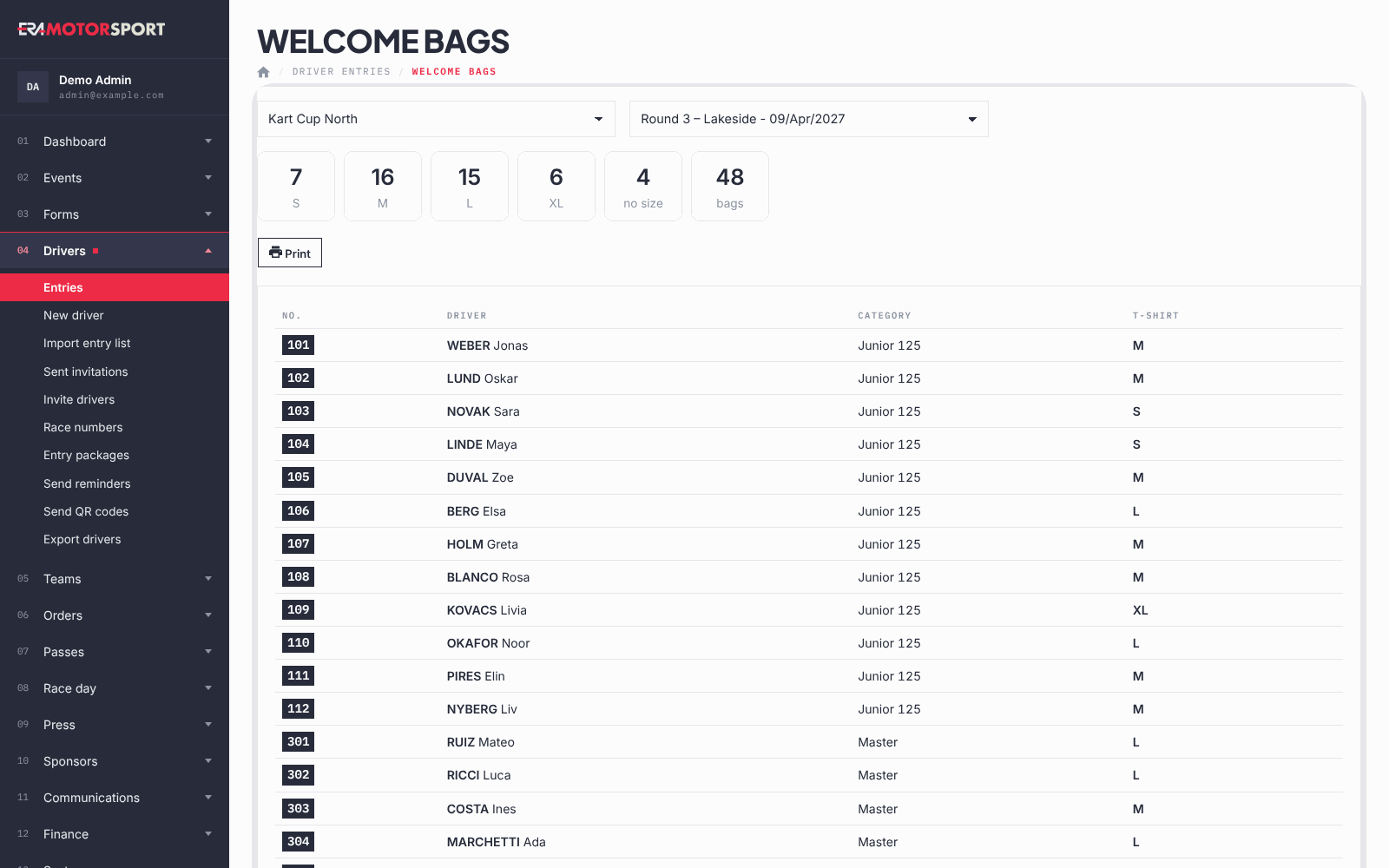
- Prepare the welcome bags. Welcome bags shows how many T-shirts per size, how many entries have no size, and the number of bags, then the list of drivers with number, category and size, to print with Print. It counts every entry that is not cancelled. Sizes come from the T-shirt size field of the form.
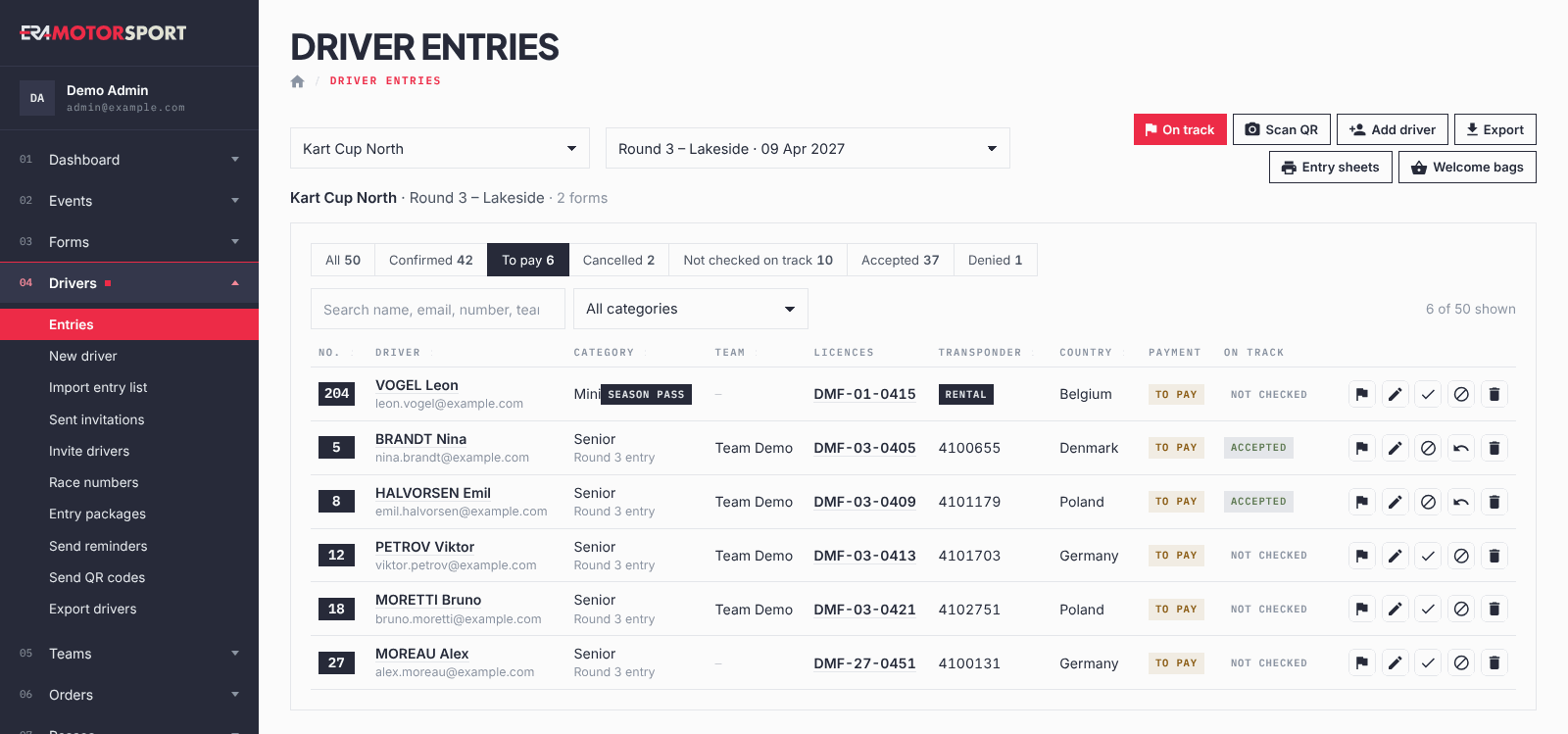
The buttons at the top lead to the pages around the list: On track (the track scanner), Scan QR, Add driver (New driver), Export (Export drivers), Entry sheets and Welcome bags. On track, Entry sheets and Welcome bags appear only when a race is selected.
What ERA checks
- You see only the championships you have access to.
- Accept, deny and delete carry a page token: if the page has been open too long, ERA answers Page expired: reload and try again. and does nothing.
- Delete always asks for a confirmation and warns when the entry is paid.
- Cancelled entries have no on-track buttons.
Common problems
| What happens | What to do |
|---|---|
| This championship has no events or season passes yet. | Create the race in Events or the season pass form in Forms. |
| A season pass driver accepted last race shows "not checked". | That is correct: accept the driver again for this race. |
| The on-track buttons do not appear. | The entry is cancelled. |
| A driver is missing from the list. | Check the Cancelled chip, and that the form the driver used belongs to this race or to a season pass that covers it. |
| Welcome bags say the forms do not ask the T-shirt size. | Add a T-shirt size field to the form in the form editor. |