
02 · Events
Championships The championship card.
In ERAEvents › Championships
Who uses itOrganizer · Superadmin
A championship groups its events, categories and forms. Its card holds what the website shows on the championship page and a few settings used on race day.
What it is for
You set the championship up once, then update regulations, bulletins, sponsors and standings during the season. The logo goes on the automatic posters and on the passes; the language chosen here is the one of the race-day prints.
Before you start
- Only a superadmin creates a new championship. Organizers edit the championships assigned to them.
- The type comes from Competition types and the organizer from Organizers.
Step by step
- Open the list. Go to Events › Championships. Search by name or website address. Each row shows the Events, the Next event, the Last event and the status. The icons open its events, its numbers, its standings by season and its card.
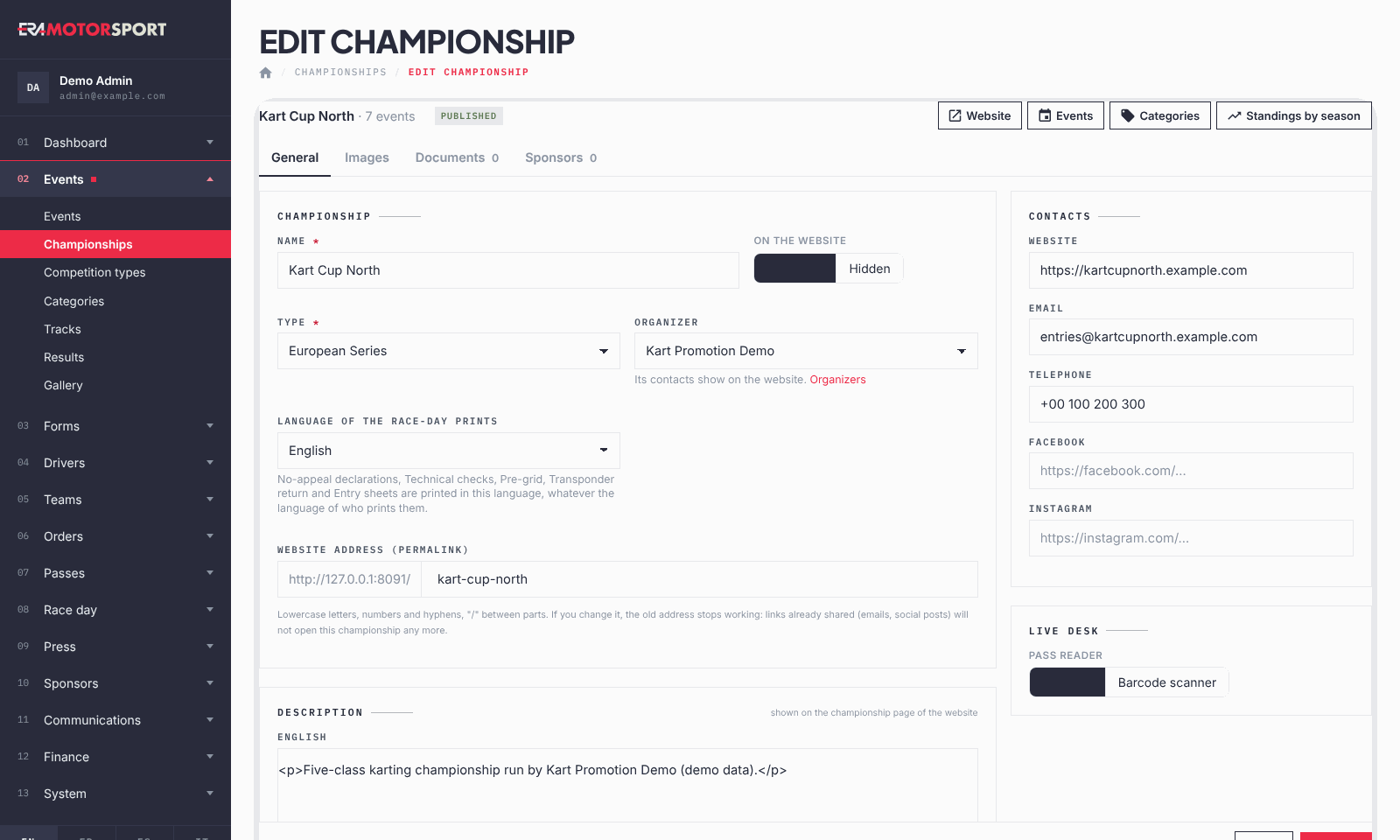
- Create or open the card. A superadmin presses New championship; otherwise open the championship. In General write the Name, choose On the website (Published or Hidden), the Type and the Organizer, whose contacts show on the website. Language of the race-day prints is the language of the no-appeal declarations, technical checks, pre-grid, transponder return and entry sheets, whoever prints them.
- Check the address, description and contacts. ERA proposes the WEBSITE ADDRESS (PERMALINK) from the name. Write the Description in English and in the national language and the Contacts: Website, Email, Telephone, Facebook, Instagram.
- Choose the pass reader. Under Live desk, Pass reader is Webcam or Barcode scanner: what the track staff use to read the passes. Press Create the championship or Save.
- Add the images. In Images upload the Logo (also on posters and passes; use PNG or JPG, because an SVG logo does not appear on the automatic poster), the Background (website) and, if you have one, the Logo animation (video). Press Save the images.
- Add the documents. In Documents add the regulations, technical forms and bulletins, as files or https:// links, and order them with the arrows. Terms and conditions is the single PDF drivers accept when they register; Current standings is the one file or link behind the Standings button of this season. For these two, Replace swaps the document.
- Add the sponsors. In Sponsors add the Sponsor logos: the first one goes on the automatic event posters. Use PNG or JPG for the sponsor logos: an SVG does not appear on the poster. Add the Sponsor banners (1280×360 px), each with the link it opens, then Save the links.
- Publish the standings season by season. Open Standings by season from the card or the list. Choose the Season, a Category or All categories / overall, a Label and an Order, then a PDF file or a link, and press Add. A PDF wins over the link. With one file in a season the Standings button of the website opens it; with more files the website lists them.
What ERA checks
- Name and Type are required. The email must be an email address; website, Facebook and Instagram must start with https://.
- The website address follows the same rules as for events: lowercase letters, numbers, hyphens and "/", unique among events and championships. Changing it breaks the old links.
- Terms and conditions accepts only one PDF.
- Only a superadmin can delete a championship, and only one with no events and no forms. Otherwise ERA asks you to hide it instead.
- In Standings by season the file must be a PDF and a link must start with http:// or https://; one of the two is required.
Common problems
| What happens | What to do |
|---|---|
| Only administrators create championships. | Ask a superadmin to create it and assign it to you. |
| A championship already uses this address. | Choose another website address. |
| The poster has no championship logo or no sponsor | The logo is an SVG. Upload it again as PNG or JPG, then make the poster again in the event. |
| The poster shows the wrong sponsor | The automatic poster uses the first of the Sponsor logos. Move the right one to the first place, then make the poster again in the event. |
| The race-day prints come out in the wrong language | Change Language of the race-day prints in General. |
| No delete icon in the list | The championship has events, or you are not a superadmin. Hide it instead. |
See also
Something does not match what you see in ERA? Write to us from the contact page.