
WhatsApp messages Messages on the drivers' WhatsApp.
WhatsApp messages to the drivers of a championship, written from approved templates. ERA fills in the name, the event, the link and the race number, shows the preview on the phone and what it will cost, and lists the deliveries and the replies.
What it is for
Use WhatsApp for what a driver must read for sure: the entry confirmed, the timetable online, a schedule change, a payment still open. A WhatsApp message is read more than an email, but every message costs money: send it to the drivers it concerns.
Before you start
- Only drivers who switched on WhatsApp in their profile on the website receive the messages, on the WhatsApp number they wrote (or their phone number), with the international prefix. The others get only the push notification and the email.
- Every text is a template approved by Meta beforehand. You choose the template; only some templates have a part that you write.
- You see the page if you can see Communications › Push notifications, and you work only on your championships.
Step by step
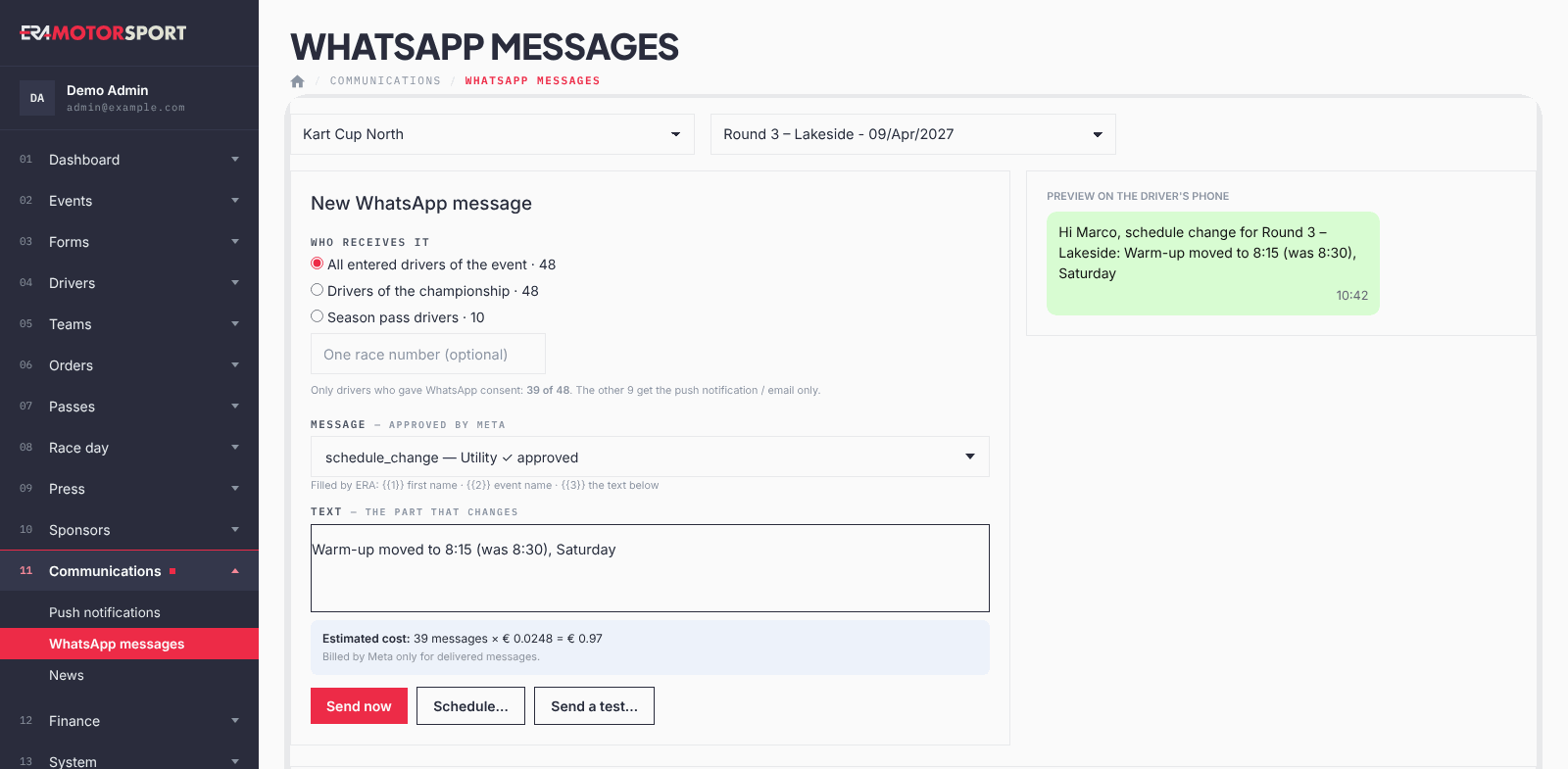
- Open the page. Go to Communications › WhatsApp messages and choose the championship at the top. To write to the drivers of one race, choose the event too.
- Choose who receives it. Under Who receives it choose all the entered drivers of the event, Drivers of the championship or Season pass drivers. Each option shows how many drivers it has. For the event you can also write one race number, for example 27.
- Check the consent. Below, ERA says how many of them gave WhatsApp consent, for example "118 of 142": only they receive the message. Drivers without a valid international number are counted apart.
- Choose the message. Under Message choose the template. ERA lists which parts it fills in by itself (first name, event, link, race number). If the template has a part that changes, write it in Text, for example "Warm-up moved to 8:15".
- Check preview and cost. Preview on the driver's phone shows the message as a driver reads it. The estimated cost is the number of messages times the price of one message.
- Send, schedule or test.
- Send now sends it at once, after a confirmation with the number of drivers.
- Schedule… opens Send at: choose date and time and confirm. ERA sends it at that time.
- Send a test… opens Test number: write one number with the international prefix (for example +39 333 1234567) and send. The message goes only to that number.
Last messages
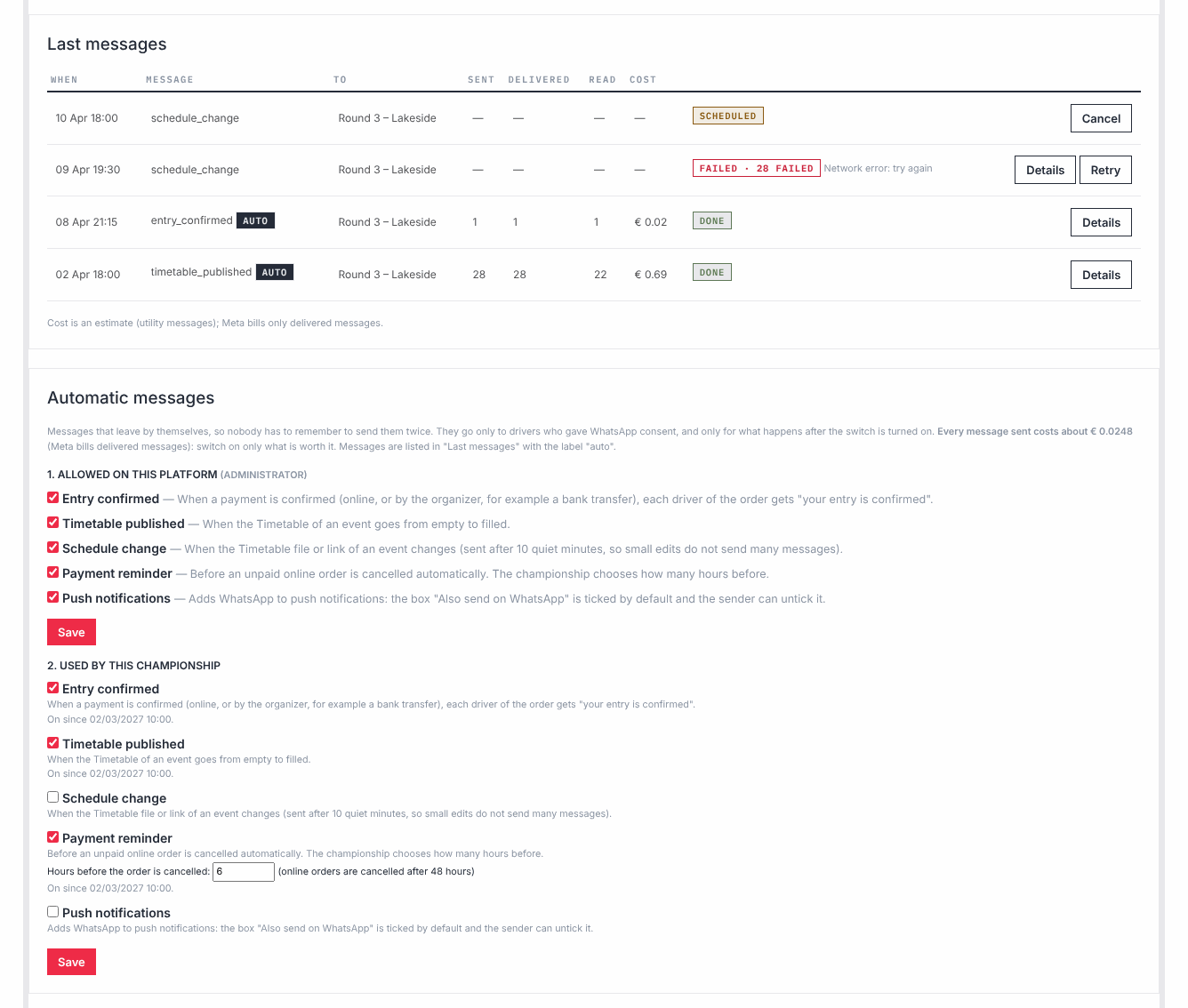
Each line shows When, the template, To (event, championship or season pass, with the race number), Sent, Delivered, Read, Cost and the status. Messages that left by themselves have the label "auto".
- "scheduled": it goes out at the time shown. Cancel deletes it before it goes out.
- "done": it went out. Details lists one driver per line, with number and status (sent, delivered, read, failed).
- "failed": it did not go out. Retry sends the whole message again.
Replies from drivers
Replies from drivers shows the last message of each number. Within 24 hours of the driver's last message you can answer from ERA with your own text and Reply; after 24 hours only a template can be sent. A driver who writes STOP switches WhatsApp off in his profile and receives nothing more.
What the driver sees
- Consent. In his profile on the website the driver switches WhatsApp on and writes his WhatsApp number with the international prefix (empty: his phone number is used). He accepts a short text saying that he can stop at any time from the profile or by replying STOP.
- The messages. They arrive from the official WhatsApp number of the series, with his first name, the event and the link written in the text.
- Replies and STOP. What he writes back arrives in Replies from drivers. If he writes STOP (also arrêt, baja or annulla), he gets a confirmation that he will receive no more race messages, and WhatsApp is switched off in his profile, where he can switch it on again.
Automatic messages
In Automatic messages some messages leave by themselves, so nobody has to send them by hand. They are all off at the start. Each one needs two switches: allowed on the platform (only a superadmin, who knows that each message costs), and used by the championship (Used by this championship, whoever manages it). It leaves only with both on, only to drivers with consent, and only for what happens after it was switched on.
| Automatic message | When it leaves |
|---|---|
| Entry confirmed | An entry is paid: by card on the website, or confirmed by the organizer (for example a bank transfer), or registered at the driver desk. Each driver of the order gets it with his race number. |
| Timetable published | The timetable of an event goes from empty to filled. |
| Schedule change | The timetable file or link of an event changes. It leaves after 10 minutes without other changes, so a few quick edits make one message. |
| Payment reminder | An unpaid card order is about to be cancelled. The championship chooses how many hours before (1 to 72, 6 if not set). It works only if unpaid orders are cancelled automatically: see Unpaid shop orders. |
| Push notifications | In New push notification the box Also send on WhatsApp appears, already ticked if the championship uses it. Not for everyone with the app. |
Each automatic message reaches a driver once for the same order or event. It leaves only if its template is approved: otherwise the box says so in red. Press Save after changing the switches.
For the superadmin
Templates lists the texts with their language and status (approved, pending, rejected). Refresh from Meta brings the current status from Meta. Only approved templates can be chosen in Message and used by the automatic messages.
What ERA checks
- You must choose who receives the message and an approved template. If the template has a part that changes, Text is required.
- A scheduled time must be at least one minute in the future. A message to one race number is sent only now.
- Only drivers with WhatsApp consent and an international number are counted and receive the message. A number written by two drivers receives one message.
- One language per message: the language of the template, not of the driver. Automatic messages use the template in the language of the championship if there is one, otherwise in English.
- The cost is an estimate with one price per message. Meta bills only delivered messages, with its own prices: the invoice is what counts.
- You see and send only the messages of your championships.
- Meta's price depends on the country of the number and on the kind of message: race messages (confirmations, timetable, changes) are the cheapest kind.
Common problems
| What happens | What to do |
|---|---|
| "Choose a message approved by Meta." or no template in the list. | No template is approved yet. Ask a superadmin to check Templates. |
| "Write the text of the message (the part that changes)." | The template has a part that you write: fill in Text. |
| "The scheduled time must be in the future." | Choose a later time, or send it now. |
| "A message to one race number is sent now: leave the time empty." | Use Send now, or remove the race number to schedule it for the whole race. |
| Few drivers receive it compared with the entries. | Only drivers who switched on WhatsApp in their profile, with an international number, receive it. Remind the drivers to do it in their profile on the website. |
| Delivered and Read stay at 0. | The statuses arrive from WhatsApp a little later. If they stay at 0, tell your ERA contact. |
| An automatic message did not leave. | Check that it is on in both switches, that its template is approved and, for Payment reminder, that unpaid orders are cancelled automatically. It does not leave for what happened before it was switched on. |
| The status is "failed". | Press Retry. The whole message goes again, also to drivers who received it: use it only when everything failed. |