
08 · Race day
Pre-grid The pre-grid list.
In ERARace day › Pre-grid
Who uses itOrganizer · Track staff
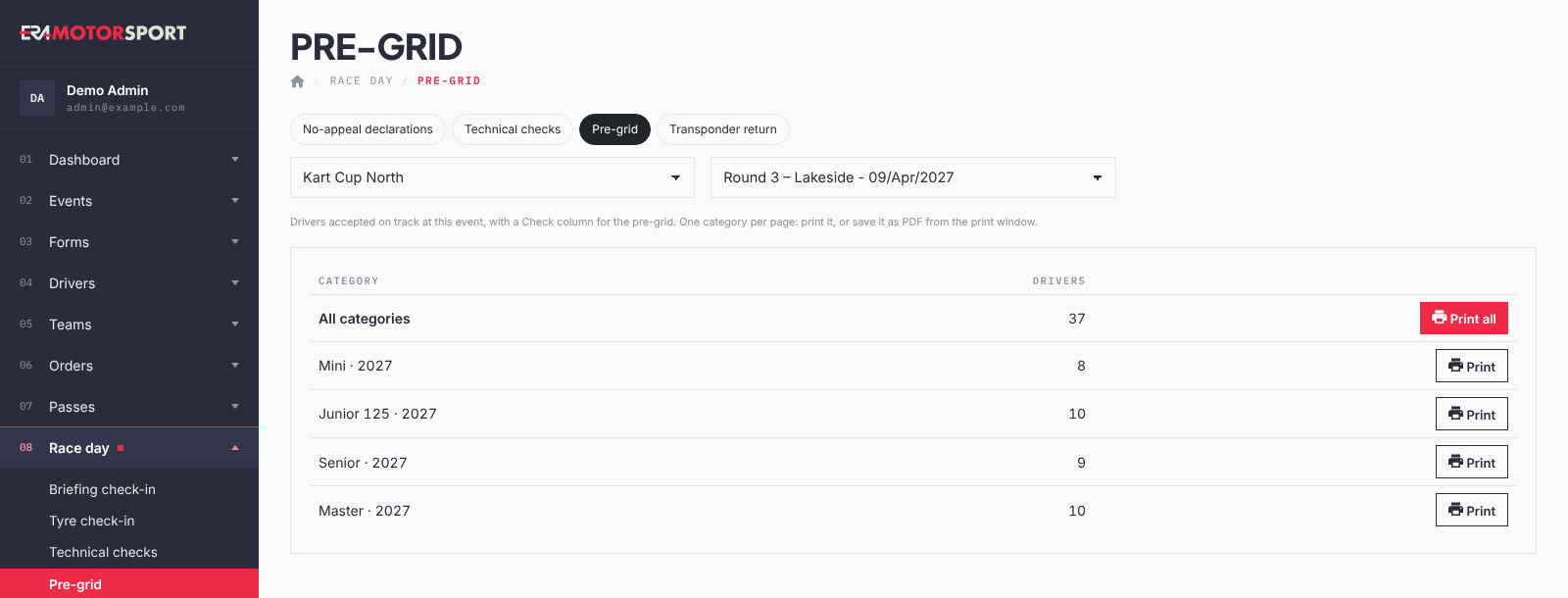
The page prints the list for the pre-grid marshals: one A4 page per category, with a Check column.
What it is for
At the pre-grid the marshals tick each kart that arrives. The sheet lists the drivers accepted on track at this event, by race number, so a missing kart is seen at once.
Before you start
Choose the language of the sheet in the championship: Language of the race-day prints in Events › Championships.
Step by step
- Open the page. Go to Race day › Pre-grid and choose the championship and the event.
- Read the table. For each category you see how many Drivers will be on the sheet.
- Print. Press Print all, or Print on the row of one category. The sheet opens in a new tab.
- Print or save as PDF. Press Print in the bar on top, and choose the printer or "Save as PDF". Each category starts on a new page.
What ERA checks
- Only drivers accepted on track at this event are listed. For a season pass, he must be accepted at this race.
- Columns: No., Last name, First name, Check.
- Season passes that cover the event are included, except for events with "Test" in their name.
- Without registration forms in ERA, the sheet lists all the drivers of the imported entry list of the event, accepted on track or not, with the full name in the last name column. Print it with Print all: the categories of an entry list cannot be printed one by one.
Common problems
| What happens | What to do |
|---|---|
| The page says nobody is accepted on track yet | Accept the drivers at the on-track desk, then print. |
| A late driver is missing | Accept him on track and print his category again. |
See also
Something does not match what you see in ERA? Write to us from the contact page.