
05 · Teams
Invite teams Bring teams back to the website.
In ERATeams › Invite teams
Who uses itOrganizer
This page sends an invitation to one form of an event to the teams that have already raced in the championship and have no password on the website yet.
What it is for
Teams that raced before may exist in ERA without a working account. Use this page before an event opens: each team gets the link to the form on the website and the link to choose its password, so it can enter its drivers itself.
Before you start
- Write the text "Team invitation" in Email settings. Without it nothing is sent, and the page shows a warning.
- If the text does not contain
{password_link}, ERA adds a short line with the password link at the end of the email.
Step by step
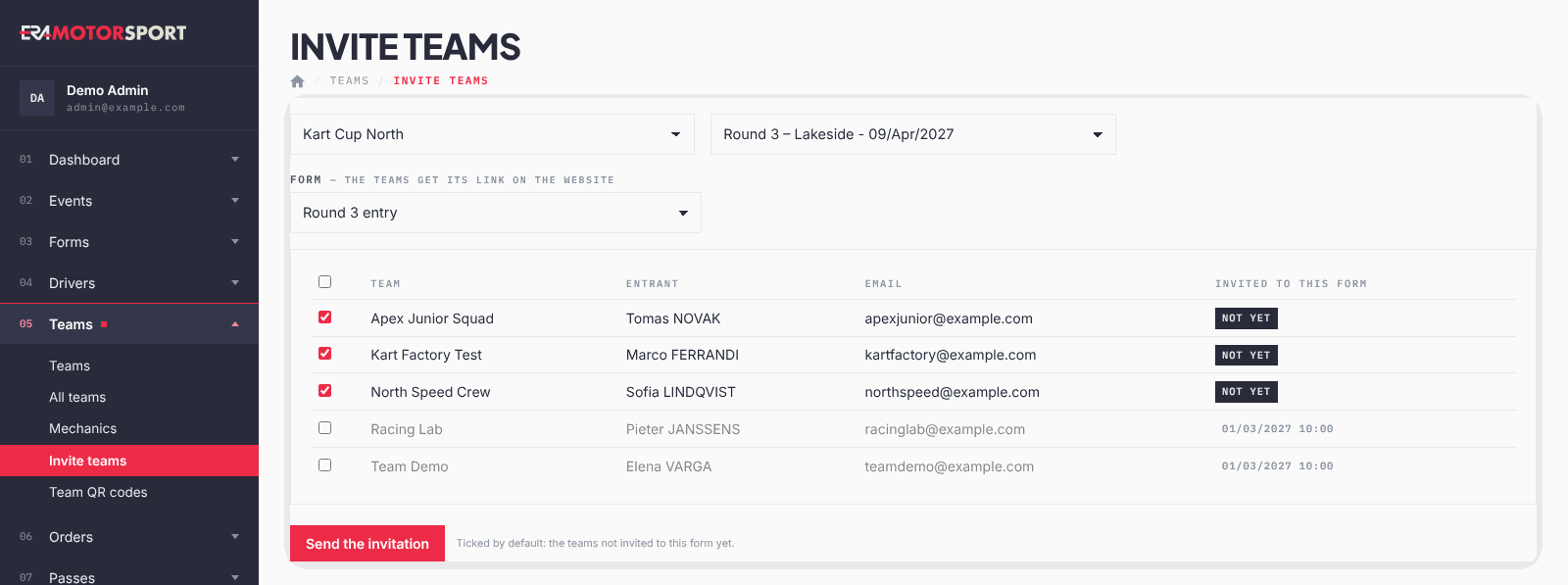
- Open the page. Go to Teams › Invite teams and choose the championship and the event.
- Choose the form. In Form pick the form the teams will get. Forms with "Team" in their name come first; a closed form is marked (closed).
- Check the list. You see Team, Entrant, Email and Invited to this form, with the date of the last invitation or not yet.
- Tick the teams. The teams not invited to this form yet are ticked already. The box in the header ticks or unticks all.
- Send. Press Send the invitation and confirm. ERA says how many teams got it and lists the emails that could not be sent.
What ERA checks
- Only teams with an email, no password, and entries or orders in this championship appear.
- Only forms of the event that are not archived can be chosen.
- You must tick at least one team.
- Each invitation sets a new password link, valid 7 days. Sending again replaces the previous link.
- The sending is written in the Action log.
Common problems
| What happens | What to do |
|---|---|
| No team to invite: every team that raced in the championship already has an account. | Nothing to do: teams with an account sign in and enter from their team area. |
| The event has no open form. | Create a form for the event, or take it out of the archive. |
| A team says the password link no longer works. | It is older than 7 days. Send it again from the Profile tab of the team card. |
See also
Something does not match what you see in ERA? Write to us from the contact page.