
13 · System
Action log Who changed what, and when.
In ERASystem › Action log
Who uses itSuperadmin
The record of the changes made in ERA: who changed what, when, and what the values were before and after. Only a superadmin can open this page.
What it is for
Use it when a number does not add up or a record has changed and nobody remembers why: a price, an entry, a payment, a user. You find who made the change, from which page, and the old value, so you can put it back.
Step by step
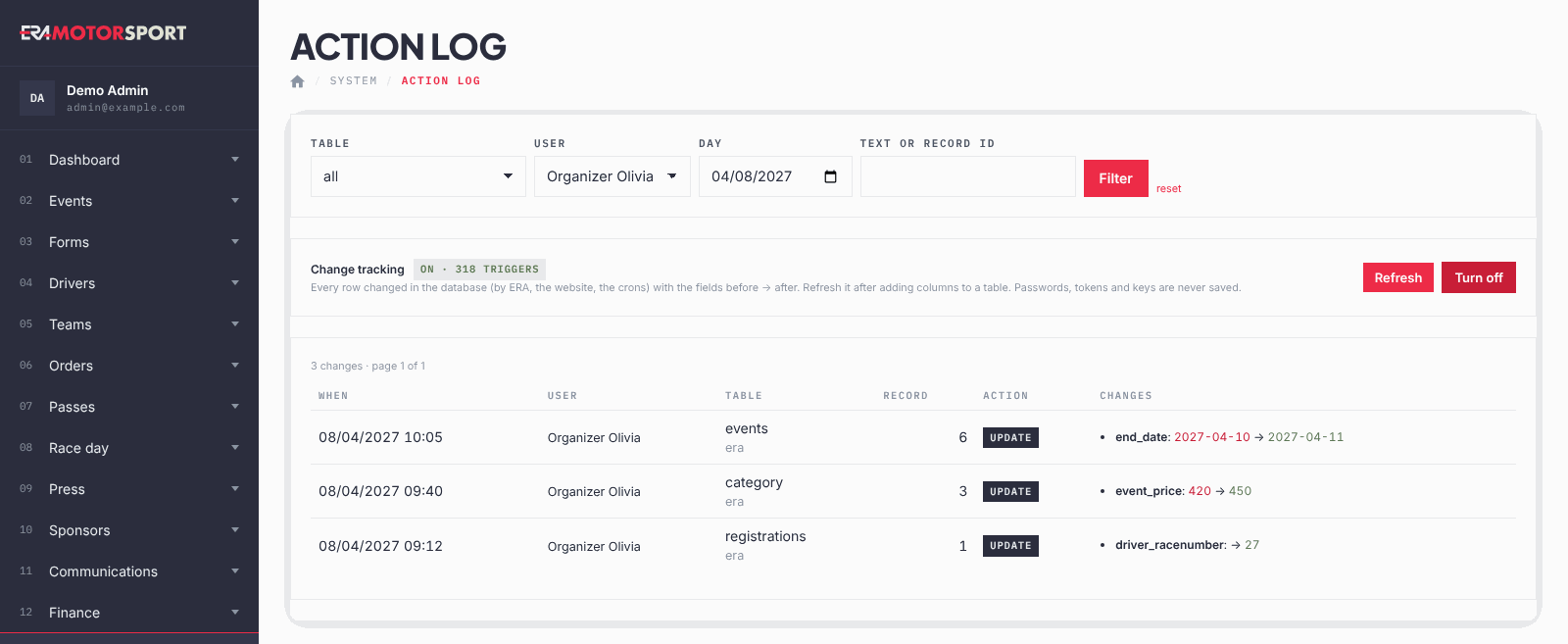
- Open the log. Go to System › Action log. The most recent change is at the top, 100 per page. Use ‹ Newer and Older › to move between pages.
- Filter. Choose a Table (the kind of record, for example users, products or registrations), a User, a Day, or write a Text or record id. Click Filter; reset clears the filters.
- Read a row. When is the date and time. User is who made the change; rows without a user come from the website or from ERA's automatic jobs. Under Table you see the ERA page that made the change. Action is insert, update or delete, or "request" for a page that does not record its own changes: then Changes lists the fields the page sent.
- Read the changes. Changes lists each field: the old value in red, an arrow, the new value in green. A new record shows only the new values.
- Turn on change tracking. In the Change tracking box, if the state is off, click Turn on. From then on ERA records every change, whether it comes from ERA, from the website or from the automatic jobs.
- Refresh it after an update. When the technical team adds new fields to ERA, click Refresh so that the new fields are tracked too. Turn off stops the tracking; the rows already saved stay.
What ERA checks
- Passwords, keys and tokens are never saved in the log. Where they changed, the row says only that they changed (hidden).
- Very long texts are shortened.
- Changes recorded by change tracking are kept for 12 months.
- Pages that do not record their own changes still leave a row with the fields that were sent, with secrets hidden.
Common problems
| What happens | What to do |
|---|---|
| "No change found." | Clear the filters with reset, or choose another day. |
| A change you know about is missing. | Check that Change tracking is on. If it was turned on recently, older changes were not tracked. |
| Turn on gives an error. | The database refused the change: tell the person who manages the ERA server. |
| The row has no user. | The change came from the website (a driver or a team) or from an automatic job. |
See also
Something does not match what you see in ERA? Write to us from the contact page.