
04 · Drivers
Invite drivers Personal links to enter.
In ERADrivers › Invite drivers
Who uses itOrganizer
Invite drivers sends each driver of your list an email with a personal link to enter one form of the race, in one category.
What it is for
Use it for wild cards, guest drivers, the drivers of a sponsor, or a race open only by invitation. The link can give the normal price, a free entry, a fixed price or a discount, and can expire on a date. ERA shows you who gets the invitation before anything is sent.
Before you start
- The race needs a registration form with categories. A form closed online can be used: ERA marks it "(closed online)".
- The invitation email needs a text: in the form (form editor, Messages) or in Email settings under the driver invitation. Without it, ERA shows a warning and nothing can be sent.
Step by step
- Choose the race. Go to Drivers › Invite drivers and choose the championship and the event.
- Choose form and category. Pick the Form, then the Category: the list shows only the categories of that form.
- Set the price. In Price choose Normal price, Free entry, Fixed price or Discount %. For a fixed price or a discount, write the amount or the percentage in Fixed price / discount.
- Set the expiry. Choose the date in Link expires on. Empty means the link works until the registrations close.
- Give the drivers. Upload a CSV file or paste the drivers one per line in …or paste the drivers, as: email, first name, last name, sponsor, sponsor email. Only the email is needed; the first row can be the header.
- Check the list. Press Check the list. Nothing is sent yet: ERA shows how many will be invited, the price and the expiry, and one row per driver with its status.
- Send. Press the send button, which shows how many invitations will go ("Send 12 invitations"), and confirm, or Change the list to go back. ERA shows the result row by row: "invitation sent" or "NOT sent".
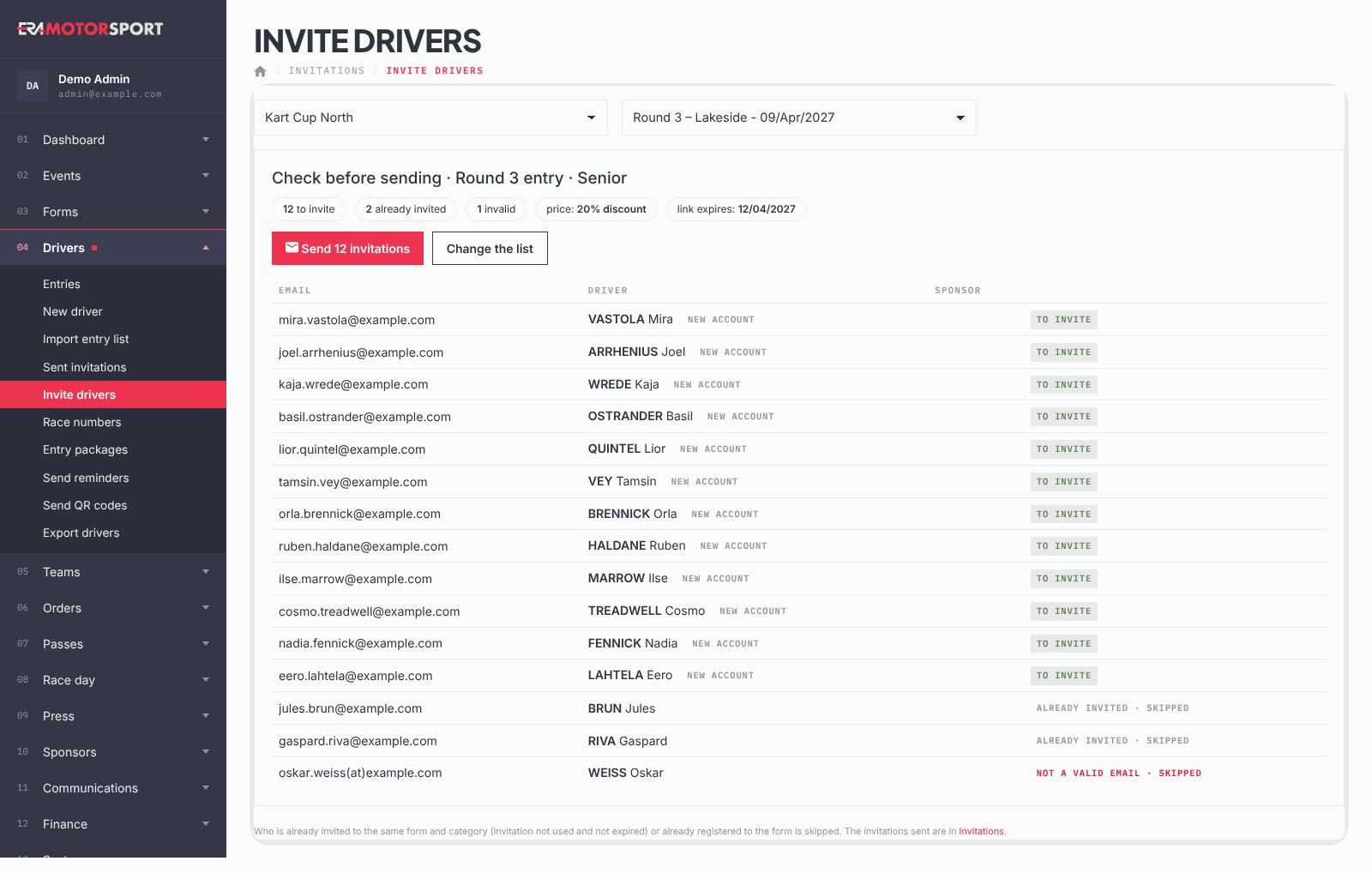
What ERA checks
In the preview, ERA skips:
- drivers already invited to the same form and category with an invitation not used and not expired ("already invited · skipped");
- drivers already entered in that form ("already registered · skipped");
- lines without a valid email ("not a valid email · skipped");
- an email repeated in the list ("repeated in the list · skipped").
Also:
- An email not yet in ERA gets a new driver account ("new account"); the driver chooses the password on the website.
- A sponsor in the list is found by its email, or by its name, and created if missing.
- A discount is at most 100%. At most 500 lines are read per sending.
- The CSV can be separated by commas, semicolons or tabs. The file must be .csv: from a spreadsheet, save as CSV.
Common problems
| What happens | What to do |
|---|---|
| Choose the category. | Pick a category of the selected form. |
| The file must be a .csv (in Excel: Save as → CSV). | Save the spreadsheet as CSV and upload it again. |
| Some rows are "NOT sent". | Check the email address and the email settings; the invitation is saved, so you can use Send reminders. |
| The send button is disabled. | Nobody is left to invite, or the invitation text is missing. |
| The same sponsor appears twice in Sponsors. | One CSV had the sponsor email and another only the name, or two different emails. Always write the same sponsor email. |
| A driver of the sponsor was skipped. | The driver was already invited to the same form and category, or already registered. A driver already registered is not linked to the sponsor by a new invitation. |
See also
Something does not match what you see in ERA? Write to us from the contact page.