
04 · Drivers
Send reminders Chase the invited.
In ERADrivers › Send reminders
Who uses itOrganizer
Send reminders emails the invited drivers who have not entered yet, each with the personal link of the invitation.
What it is for
A few days before the registrations close, you remind the drivers you invited. ERA lists them category by category and sends each one the same link of the invitation, so the price and the expiry stay the same.
Before you start
The reminder email needs a text, written in Email settings under the registration reminder. Without it ERA shows a warning and the buttons are disabled.
Step by step
- Choose the race. Go to Drivers › Send reminders and choose the championship and the event.
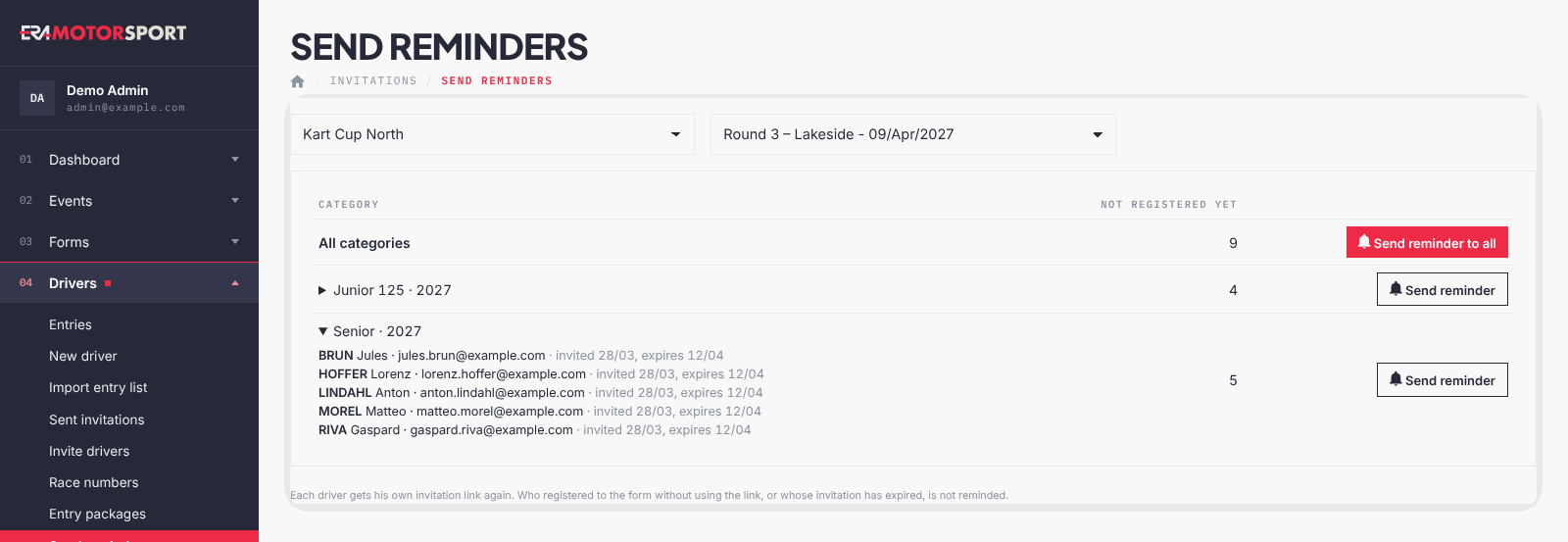
- See who is left. The table shows All categories and then each category with the number Not registered yet. Click a category to see the drivers, with the date of the invitation and the expiry.
- Send to one category. Press Send reminder on its row and confirm.
- Send to everyone. Press Send reminder to all and confirm.
- Read the result. ERA says how many reminders were sent and how many were not.
What ERA checks
- Only invitations not used and not expired are reminded.
- Drivers who entered the form without using the link are not reminded.
- A driver with several invitations to the same form and category gets one reminder, with the most recent invitation.
- Each send asks for a confirmation with the number of drivers.
Common problems
| What happens | What to do |
|---|---|
| Nobody to remind: everyone invited to this event has registered, or the invitations have expired. | Check Sent invitations; for expired links send new invitations. |
| Some reminders were not sent. | Check the email addresses and the email settings in Email settings. |
See also
Something does not match what you see in ERA? Write to us from the contact page.