
New driver Enter a driver from the office.
New driver enters a driver in a race for you, with the same form the driver would fill in on the website.
What it is for
Use it when a driver sends the entry by email or phone, or cannot use the website: you fill in the form of the race and choose whether the entry is already paid or still to pay. ERA saves it exactly like an entry made on the website, so passes, entry list and invoices see it the same way. At the track the same form opens from the driver desk.
Before you start
The race needs at least one registration form that is not archived. A form closed online (closing date passed, or by invitation only) can still be used from here: ERA marks it "closed online". Season pass forms are not offered here.
Step by step
- Choose the race. Go to Drivers › New driver and choose the championship and the event.
- Find the driver. Write the email in Email of the driver and press Continue, or search by name or email in …or search a driver already in ERA and press Register on the right row. A new email creates the driver account: the driver sets the password on the website with "Forgot password".
- Choose the form. If the race has more than one form, ERA lists them: click the one to use.
- Fill in the entry. In 1 · Entry choose the Category (with price, number range and places left) and, if the form has them, the ticket and the Race number. A category the driver is already entered in is greyed out. A full category is shown as "FULL" but can still be chosen.
- Check the driver data. 2 · Driver data shows all the fields of the form, filled with what the driver gave last time. Upload documents and collect signatures on the tablet. Parent or guardian fields appear when the driver is under 18 on the day of the race.
- Set the payment. In 3 · Payment ERA shows the Total. In Paid with choose the method under Already paid and tick I have collected the amount, or choose To pay by bank transfer or To pay at the track under Not paid yet. Add a Note if useful, e.g. the receipt number.
- Save. Press Register and mark as paid (or Register (payment to receive) for an entry to pay). ERA opens the entry card of the new entry.
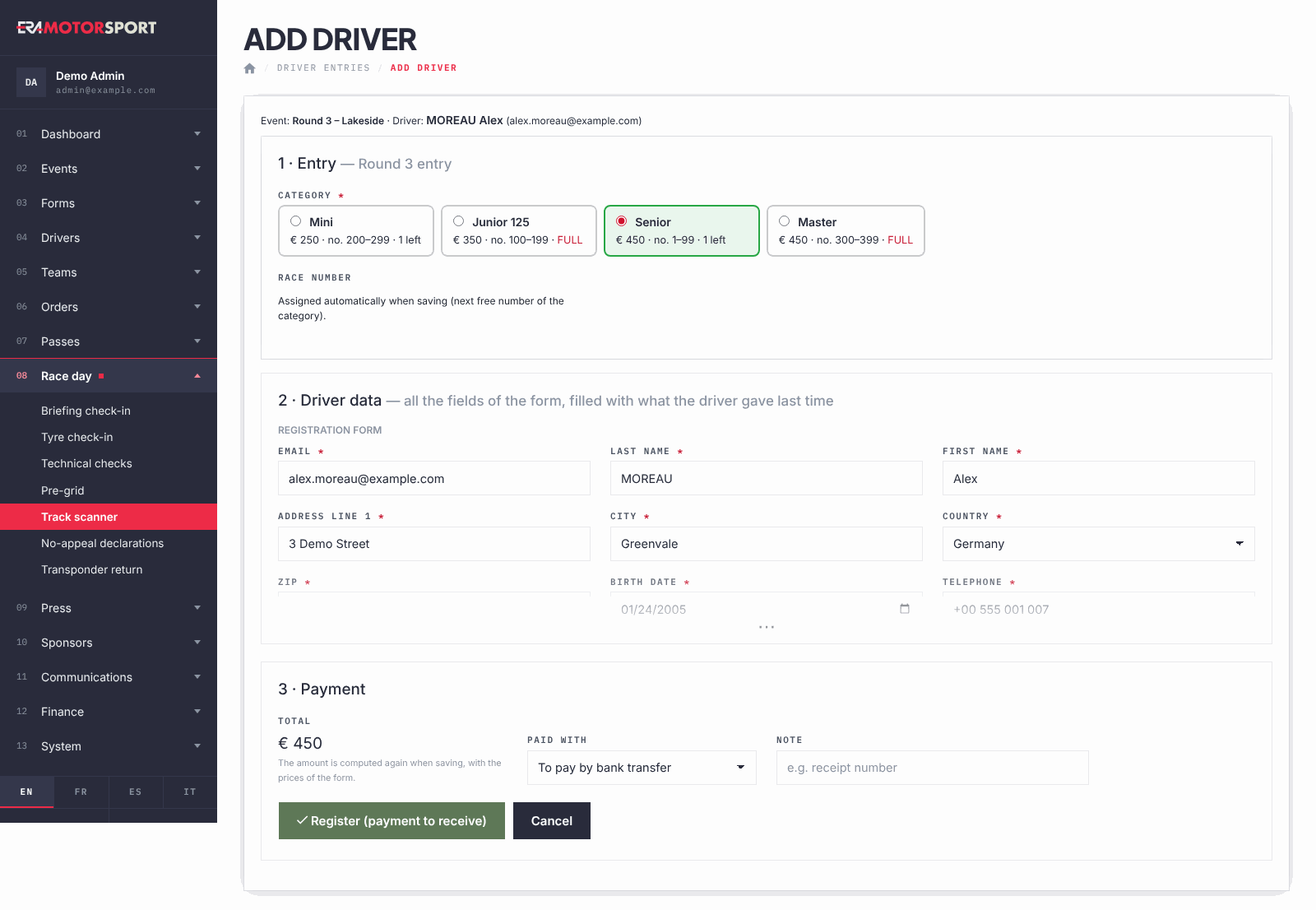
An entry to pay is confirmed later from its entry card, with Payment.
What ERA checks
- The email must be valid; for a new driver, first and last name are required.
- Required fields of the form, valid email addresses, and values that must be unique (for example a licence number already used by another driver) are checked; ERA shows Check the fields in red. and keeps what you wrote, uploaded files and signatures included.
- The race number, if the form asks for it, must be up to 4 digits and free in that category at this race; ERA suggests a free one. If the form assigns numbers automatically, ERA gives the next free number of the category when saving.
- The driver cannot be entered twice in the same category of the same form, and cannot enter a race already covered by a confirmed season pass.
- With a total above zero you must choose how the driver paid; for "already paid" you must tick I have collected the amount.
- The total is computed again when saving, with the prices of the form.
- New driver sends no email to the driver.
Common problems
| What happens | What to do |
|---|---|
| This event has no registration form in ERA: create one in Forms to register drivers. | Create the form in Forms. |
| The driver is already registered in this category. | Open the existing entry from Entries. |
| The driver has a season pass that covers this event: he is already entered. | Nothing to do: the season pass entry is in the list of the race. |
| Another registration on this form is being saved right now: try again in a moment. | Press the button again after a few seconds. |
| The number is "already taken in this class". | Use the free number ERA suggests. |